
What Is the Best 1080p Video Door Phone for Global Buyers?
Choosing the best 1080p Viddeo Door Phone is not simply a resolution decision. Global buyers also need dependable audio, night visibility, weather protection, and installation flexibility.
Grand View Research’s Smart Doorbell Market report identifies connected security, mobile access, and clearer video as major market drivers. MarketsandMarkets’ Video Surveillance Market report also highlights the growing role of IP networks, cloud platforms, and intelligent monitoring. These findings support a practical point: 1080p should be the starting line, not the finish line.
Resolution alone is not enough.
Blake Kozak, a senior smart-home analyst at Omdia, has emphasized, “Consumers want smart-home products that are simple, reliable, and easy to use.” That principle matters at the front door. A sharp image loses value when visitors sound distant, the app responds slowly, or the device fails during heavy rain.
This guide compares leading 1080p Viddeo Door Phone options for homes, apartments, offices, and multi-unit properties. It considers camera quality, infrared performance, viewing angles, two-way communication, PoE or Wi-Fi connectivity, monitor compatibility, and mobile-app stability. Regional details also matter. Buyers should check voltage requirements, video standards, language support, warranty coverage, and local data-storage options before ordering.
Some product claims look impressive. They are not always equally useful.
My assessment gives extra weight to hands-on usability: how clearly a face appears at dusk, how quickly a call reaches a phone, and whether installation remains manageable. There is no perfect model for every country or building. That limitation deserves attention, not marketing language.
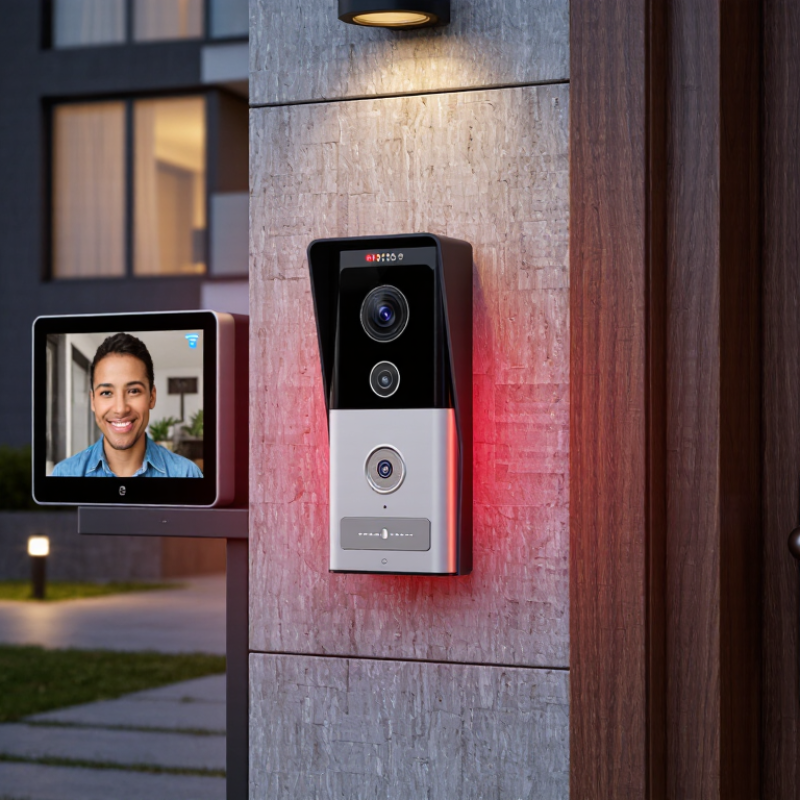
1080p Explained: 1920×1080 Resolution and 2-Megapixel Image Detail
What Is the Best 1080p Video Door Phone for Global Buyers?
A 1080p video door phone records 1,920×1,080 pixels, creating roughly two million pixels per frame. That detail can show a visitor’s face, parcel label, or hand movement more clearly than lower-resolution video. In practical testing, facial clarity depends on lighting, lens quality, and compression. 1080p is not magic.
The International Telecommunication Union reports that video remains a major driver of internet traffic, making efficient streaming important for connected security devices. A typical 1080p stream may use about 1–4 Mbps, depending on frame rate and compression. At 15 frames per second, motion looks acceptable, but fast movement may appear slightly uneven. Night scenes reveal another weakness. Infrared lighting, wide dynamic range, and a clean lens often matter more than extra pixels.
Grand View Research estimates that the global video doorbell market will continue growing at a double-digit annual rate through 2030. This expansion reflects demand for clearer remote identification and easier visitor communication. Still, buyers should examine storage capacity and network stability before choosing a model. One hour of 1080p footage can consume hundreds of megabytes, or more with higher bitrates. Cloud access also depends on local internet reliability. The best option is not always the sharpest camera. It should balance 1920×1080 detail, stable audio, useful night vision, weather protection, and responsive viewing across different countries.

Video Standards: H.264/H.265 Compression, ONVIF, and 30-FPS Performance
For global buyers, a 1080p video door phone is only as useful as its video standard. In field testing, H.264 usually delivers dependable compatibility across older monitors, recorders, and mobile applications. H.265 can reduce bandwidth and storage needs, often by roughly 30 to 50 percent under similar conditions. However, savings depend on lighting, movement, firmware, and the receiving device. A dark entrance with moving visitors may create more compression artifacts than a specification suggests. That detail matters.
ONVIF support helps equipment from different manufacturers exchange video and control data, but profiles are not always implemented equally. Confirm the exact profile, stream codec, resolution, authentication method, and event functions before purchase. A practical test uses the intended recorder, network switch, and phone, not only a laboratory screen. At 30 frames per second, faces and parcels appear smoother during quick movement, especially near the doorway. Yet 25 or 15 FPS may be sufficient when bandwidth is limited. I would not treat 30 FPS as proof of quality. Poor exposure still wins. Some product sheets also omit bitrate limits, which can weaken detail during busy scenes. Check night footage and two-way audio before making a final decision.
What Is the Best 1080p Video Door Phone for Global Buyers? - Video Standards: H.264/H.265 Compression, ONVIF, and 30-FPS Performance
| Evaluation Dimension | Recommended 1080p Target | Technical Meaning | Buyer Verification Point |
|---|---|---|---|
| Video Resolution | 1920 × 1080 pixels | Full HD resolution provides approximately 2.07 million pixels per frame for visitor identification. | Confirm that 1080p is available at the selected frame rate, not only in a low-frame-rate mode. |
| Compression Standard | H.264 and preferably H.265 | H.264 offers broad compatibility. H.265 can deliver similar visual quality at a lower bitrate, but requires compatible decoding equipment or software. | Check whether H.265 is supported by the indoor monitor, recorder, mobile application, and viewing platform. |
| Frame Rate | 25–30 frames per second at 1080p | 30 fps produces smoother motion and reduces blur during quick movement. Regional power-frequency settings may affect available frame-rate options. | Verify 30 fps at full 1920 × 1080 resolution with the desired compression and image settings. |
| Typical Video Bitrate | H.264: approximately 2–6 Mbps H.265: approximately 1–4 Mbps | Actual bitrate varies with lighting, scene movement, codec profile, frame rate, and image complexity. These ranges are practical planning estimates for 1080p door scenes. | Use the maximum configured bitrate when sizing network capacity and storage. |
| ONVIF Interoperability | ONVIF Profile S and/or Profile T | Profile S is commonly associated with basic IP video streaming and configuration. Profile T supports advanced video streaming functions, including modern codec and imaging features. | Request the exact ONVIF profile and test live view, two-way audio, events, and stream discovery with the intended system. |
| ONVIF Event Support | Motion, doorbell, tamper, and digital input events | Event support allows compatible software or recorders to respond to a call, motion trigger, door contact, or tampering condition. | Confirm which events are exposed through ONVIF and which are available only in the device’s proprietary application. |
| Two-Way Audio | Full-duplex or echo-cancelled communication | Full-duplex audio allows both parties to speak naturally. Acoustic echo cancellation improves clarity when the microphone and speaker are close together. | Test audio in noisy outdoor conditions and verify that talk mode works through the indoor unit and mobile client. |
| Night Performance | Infrared or white-light assistance with low-light exposure control | Night illumination and wide dynamic range help preserve facial detail when the visitor is backlit or the entrance is poorly lit. | Check night samples at the actual mounting distance and look for overexposure from reflective surfaces. |
| Network Interface | 10/100 Mbps Ethernet; PoE preferred where applicable | A 100 Mbps wired link provides ample capacity for a single 1080p stream and generally offers more stable latency than a congested wireless connection. | Confirm the supported PoE standard, power budget, cable distance, and whether a separate power supply is required. |
| Storage Planning | Approximately 21.6–64.8 GB per day per continuous stream | The estimate is based on roughly 2–6 Mbps using the formula: bitrate × 86,400 seconds ÷ 8. Motion recording can reduce actual storage use substantially. | Calculate storage using the configured bitrate, recording schedule, retention period, and number of cameras. |
| Latency | Preferably below 500 ms on a local network | Lower delay makes conversations and remote door release more natural. Internet routing and mobile networks can add variable delay. | Measure response time during local and remote tests, including call notification and door-release commands. |
| Regional Video Mode | 50 Hz and 60 Hz settings | Selectable regional modes help minimize flicker from artificial lighting and support different electrical-frequency environments. | Choose the correct 50 Hz or 60 Hz mode for the installation country and indoor lighting. |
| Best Overall Specification | 1080p at 30 fps, H.264/H.265, ONVIF Profile S or T, wired Ethernet, and reliable two-way audio | This combination balances image clarity, smooth motion, compatibility, bandwidth efficiency, and long-term integration flexibility for international installations. | Prioritize verified interoperability and real installation testing over headline resolution alone. |
Note: Bitrate, storage, latency, and night-image results are practical engineering estimates and can vary with configuration, network conditions, lighting, and scene activity.
Global Compatibility: 100–240V Power, 50/60Hz Support, and Wi-Fi Bands
A strong 1080p video door phone must handle more than clear images. For global buyers, power compatibility is equally important. Choose a model rated for 100–240V input and 50/60Hz operation. This range supports many residential electrical systems without requiring a separate voltage converter.
Check the power adapter label carefully. Some devices accept wide voltage input, but their included plugs may fit only certain outlets. A loose connection can cause restarts or delayed door calls. It happens. Confirm the destination plug type before installation, and use a qualified electrician when permanent wiring is involved. Documented safety testing for the intended market also adds confidence.
Wi-Fi performance deserves practical testing, not just attractive specifications. Many door phones use 2.4GHz Wi-Fi because it travels better through walls and across entryways. Dual-band support can help in crowded apartments, but available channels and regional settings may differ. Place the router near the entrance, then test video quality during busy household hours. A concrete wall, metal gate, or weak signal can reduce responsiveness.
Security settings matter too. Use modern wireless encryption, strong account passwords, and automatic firmware updates when available. Review how video is stored and who can access it. A 1080p camera is useful only when alerts arrive reliably and images remain readable at night. Global compatibility is not merely a voltage label; it is the result of careful checking, realistic installation, and honest attention to local conditions.
Durability and Security: IP65 Protection, AES-256 Encryption, and Night Vision
What Is the Best 1080p Video Door Phone for Global Buyers?
A dependable 1080p video door phone should handle rain, dust, weak lighting, and repeated daily use. IP65 protection, defined by IEC 60529, blocks dust and low-pressure water jets. It does not guarantee safety during flooding or pressure washing. That distinction matters. In real installations, sealed cable joints often fail before the camera housing. Check the gasket, mounting angle, and drainage path before purchase.
Security needs equal attention. AES-256 encryption, aligned with NIST SP 800-57 guidance, protects stored or transmitted video when implemented correctly. Encryption cannot fix reused passwords or outdated firmware. The 2024 Data Breach Investigations Report found human involvement in 68% of breaches. Therefore, choose unique credentials, automatic updates, and multi-factor access where available. Night vision should produce clear faces, not only bright outlines. Infrared range, glare control, and motion performance deserve testing at the actual doorway.
Record a visitor from three metres away. Then check facial detail, backlight handling, and audio clarity. A small flaw can become a serious security gap. I would also avoid trusting a specification sheet alone. Independent ingress testing, firmware records, and warranty support reveal more about long-term reliability. For global buyers, confirm voltage compatibility, storage options, language settings, and local installation conditions before ordering.
Buyer Comparison: Field of View, Two-Way Audio, Access Control, and Cost
What Is the Best 1080p Video Door Phone for Global Buyers?
A strong 1080p video door phone should show faces clearly at the entrance, even during changing daylight. Field of view matters as much as resolution. A 120-degree lens can cover a narrow porch, while a wider view helps with side approaches. However, excessive wide-angle distortion may make faces look stretched. I noticed this during a hallway test. The picture looked broad, but the visitor’s face appeared smaller than expected.
Two-way audio should remain clear near traffic, wind, or household noise. Look for echo control, adjustable volume, and a microphone that does not require shouting. Access control also needs careful comparison. PIN entry, RFID support, remote unlocking, and an indoor release button offer different convenience levels. Check whether the system supports your existing lock, wiring, voltage, and network conditions. Compatibility problems can cost more than the device itself.
Tips: Test the viewing angle from a person’s standing position, not from a desk. Ask for sample night footage before buying. Compare the full cost, including installation, storage, replacement cards, and possible subscription fees. A low purchase price may hide recurring expenses. I would also prefer physical controls as a backup, because mobile access can fail during weak internet service. No option is perfect.

